Short answer
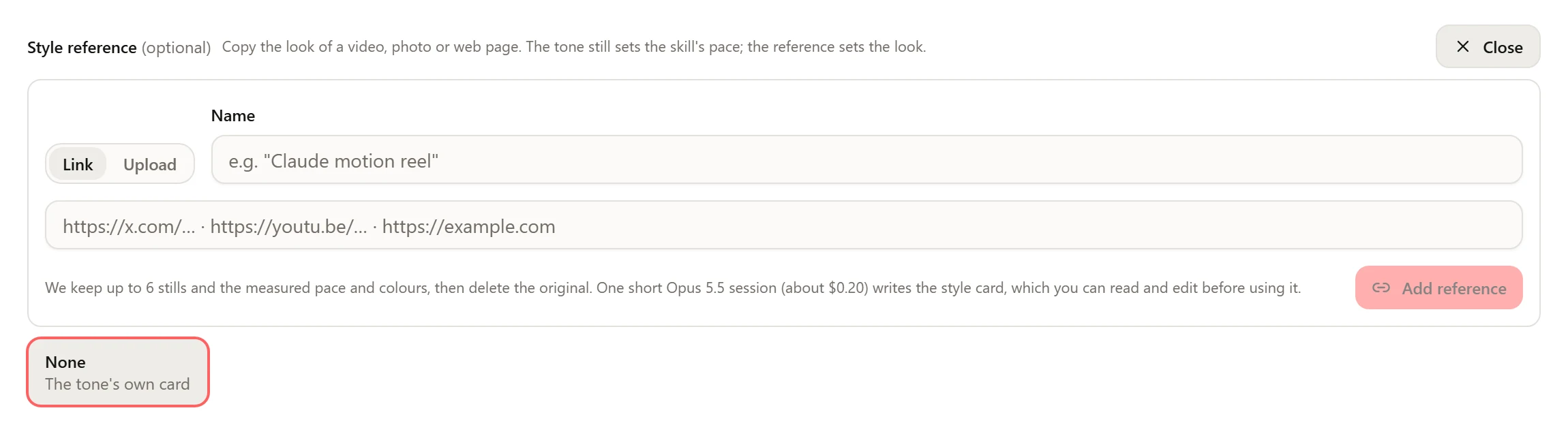
A style reference is a link, photo or video whose look you want your video to have. MotionRepo measures it, keeps up to six stills and a written description of its look, deletes the original, and makes your video in that style instead of a preset tone. Style references are free on every plan.
Key points
- A style reference can be a link, a photo or a video.
- The original is deleted after measuring; only up to six stills and a written description are kept.
- Links to private network addresses are refused.
- Style references cost no credits. Logo upload and brand kits are not available yet.
01
What is a style reference?
MotionRepo has 14 preset tones, from Polished to UI morph. A style reference replaces the preset with a look you choose: your own website, a past launch video, a poster, or any page whose type, color and motion you want to borrow.
The reference sets how the video looks. What the video says still comes from your repository: its screens, its copy and what the code does. A reference never brings its own text, logos or product into your video.
02
What happens to the reference you give it?
MotionRepo measures the reference once and keeps only what it needs to follow the look.
- The original video or photo is deleted after measuring.
- Up to six stills and a written description of the look are kept with your video.
- Links to private network addresses are refused, so a reference cannot be used to reach machines inside your network.
The security page lists this alongside what happens to your code.
03
How do you choose a good reference?
A good reference has a clear, consistent look. A few habits help:
- Pick one source, not a mix. Two references that disagree give a video that agrees with neither.
- Prefer something with motion if you want motion. A still image shows type and color well, but not pacing or transitions.
- Choose your own material when you can: your website, your product’s marketing pages or an earlier video. Then the result looks like your brand rather than someone else’s.
- Make sure the look suits the format. A dense landscape layout may not survive a vertical crop of 1080×1920.
04
Should you use a reference or a tone?
Use a tone when you want a strong, tested look quickly; choosing a video tone compares all 13. Use a reference when the video has to sit next to your existing brand: on your homepage, in a deck, or in a series of launches that should look alike.
You can combine a reference with a direction of up to 6,000 characters. The reference sets the look; the direction says what to show and who the video is for.
05
What is not available yet?
Logo upload and brand kits are not available yet. Today the closest you can get is a reference that already carries your brand’s type and colors, such as your own website.
If the first result is close but not exact, a short note can adjust it, for example "use the darker background from the reference throughout". Revise with a note keeps the previous version, so nothing is lost by trying.
06
Questions
Do style references cost extra?
No. Style references are free on every plan, like voice narration.
Is the video or photo I give it kept?
No. The original is deleted after measuring. Only up to six stills and a written description of its look are kept.
Can I upload my logo?
Not yet. Logo upload and brand kits are not available today.
Will the video copy the reference’s text or product?
No. The reference sets the look only. What the video shows and says comes from your repository.